Ear Agent Live : Hearing Aid
- 4.7
- Rating
- 500.00K
- Installs
- Free
- Price

 Analysis by App-foxy
I approached Ear Agent Live: Hearing Aid as a practical communication tool rather than a novelty sound gadget. Its central idea is simple: use an Android phone and connected headphones or earbuds to make nearby sound easier to hear. That can be appealing when you are trying to follow a quiet conversation, listen to someone from another part of a room, or bring more attention to voices around you. The first impression is immediate because the app does not ask you to learn a complicated system before trying its main purpose.
What matters, though, is whether that first-week curiosity turns into a useful habit. In my experience, an audio booster can feel impressive during a short demonstration and much less convincing when used every day. Ear Agent Live sits in that interesting middle ground: it may help in specific listening situations, but it is not a replacement for professional hearing care or a dedicated hearing aid. I would recommend testing it patiently, with realistic expectations, before deciding whether it deserves a permanent place on your phone.
How the app feels during the first week
The app is a free communication app from One Music Player, and it is aimed at people who want to experiment with their phone as a listening aid. Its store summary presents the product as a way to power up your ears, while the shorter store description simply calls it Ear Agent Live. Those phrases are attention-grabbing, but the more useful way to understand it is as a live audio relay: the phone listens through its microphone and sends sound to headphones or earbuds.
You May Also Like

 Blood Strike: 2.5 Anniversary
Blood Strike’s Loadouts Turn Every Drop Into a Tactical Gamble
A close look at Blood Strike’s custom loadouts: how fast access to signature weapons reshapes its battle royale rhythm, rewards preparation, and narrows the gap between fights.

 Pandora - Music & Podcasts
Pandora’s Music Is Easy to Start, but Harder to Recover
Pandora’s strength is its low-effort path from a seed to a station. Its weak spot is how much confidence it asks you to place in connection, setup, and quiet recovery.

 8 Ball Pool
 Is Built on Rivalries, Rematches, and Routine
A close look at the rivalries, rematches, shared routines, and unanswered safety questions that turn a quick pool match into a persistent mobile community.

 Samsung Music
’s Quiet Strength Is Playing What You Already Own
Its reach comes less from spectacle than from dependable access to a personal library. That simplicity is both the app’s strongest retention engine and its ceiling.

 AccuWeather: Weather Radar
AccuWeather Review: A Quick, Clear Forecast for Everyday Decisions
For everyday plans, the best forecast is the one you can understand quickly. AccuWeather makes rain timing, radar, and local conditions easy to act on, with a few trade-offs.

 Hill Climb Racing
Why Hill Climb Racing Still Turns Crashes Into One More Run
A tiny car, a bumpy hill and one more upgrade: Hill Climb Racing keeps resurfacing because its simple chaos makes every near-miss feel personal.
More From Our News Desk



That setup makes the choice of accessories important. The phone microphone is usually close to your body rather than close to the person speaking, so positioning the phone can affect the result. If I place it on a table between two people, it has a better chance of capturing the conversation than if it stays in a pocket. A wired headset may also feel more predictable than wireless audio, where delay can make conversation uncomfortable. This is one of the first practical lessons: the app itself is only part of the listening chain.
During the first few uses, I would start with ordinary speech in a quiet room instead of immediately testing it in a busy café or outdoors. That gives you a reference point for the natural sound of your headphones. If the amplified signal feels harsh, loud, or strangely distant, lowering the phone and headphone volume is more sensible than trying to force maximum volume. More amplification is not automatically clearer amplification.
The app can be attractive to someone who wants a quick, low-cost experiment. It does not require the commitment of buying specialized hardware, and the age rating is Everyone, making the presentation broadly accessible. It is available for Android devices running version 8.0 or later, which covers many phones still in everyday use. The current version is 6.1.0, so users should keep their expectations tied to the experience on their own device rather than assuming every phone will behave identically.
A realistic first-week scenario would be an older family member trying to follow a conversation at home while another person speaks from across the room. The listener could place the phone on a nearby table, connect headphones, and compare the result with simply raising the television or asking people to repeat themselves. That test is more useful than trying to judge the app with a dramatic “spy ear” experiment. The goal should be understandable speech, not exaggerated environmental noise.
The small workflow that makes testing more useful
I would use a short, repeatable routine. First, check the phone’s microphone opening and make sure the case is not obstructing it. Next, connect the listening device before starting the session. Then test one familiar speaker at a comfortable distance, followed by a second position with the phone moved closer to the conversation. Finally, compare the amplified feed with normal hearing. This reveals whether the improvement comes from the app or simply from changing where the microphone sits.
That last comparison is easy to overlook. Moving a phone closer to a speaker can improve the signal even without sophisticated processing, while placing it near a noisy appliance can make the experience worse. I found this to be a more important habit than chasing the loudest setting. The app is most useful when treated as a tool for controlling microphone placement, not as magic that can separate every voice from every background sound.
There is also a social side to the first-week experience. Wearing headphones while holding or placing a phone near a conversation can look unusual, especially in public. If you plan to use it around other people, explain what you are doing. That avoids confusion and makes it easier to ask someone to speak toward the phone. In a private setting, this is barely an issue; in a meeting, shop, or family gathering, it can become part of the app’s practical friction.
The app has earned a 4.7 average from around 4.2 thousand ratings, and it has passed the half-million-install mark. Those figures suggest that the concept has found an audience, but they do not guarantee that it will suit every hearing situation. Audio comfort depends heavily on the phone, headphones, room acoustics, and the listener’s needs. I would read the popularity as a reason to try it carefully, not as proof that it can replace a hearing assessment.
What remains useful after the novelty fades
The long-term question is not whether the app can make a sound louder once. It is whether I would remember to use it when a listening problem appears. That depends on how predictable the setup becomes. If connecting headphones, opening the app, positioning the phone, and finding a comfortable volume takes only a moment, it can remain useful for occasional situations. If every session requires repeated adjustment, the novelty will probably disappear.
Its strongest recurring use is likely to be situational rather than constant. Someone may keep it available for quiet conversations, listening to a speaker in a small room, or checking whether a person nearby is speaking. I would not build my entire day around it unless the experience is consistently comfortable and the phone can stay in a sensible position. A tool that helps twice a week can still be worthwhile; it does not need to become a permanent audio stream to justify keeping it installed.
Compared with ordinary alternatives, Ear Agent Live is more flexible than simply turning up the television or asking everyone to speak louder. It lets the microphone move closer to the sound source, which can be valuable when the listener cannot sit near the speaker. Compared with a dedicated hearing aid, however, it is much less discreet and less purpose-built. A hearing aid is designed to stay with the user, manage listening conditions, and fit a daily routine. A phone-based solution asks the user to carry and arrange several separate pieces.
Compared with a standard voice recorder, the live approach is more immediate because it is intended for listening in the moment rather than reviewing a saved recording. Compared with accessibility tools built into a phone, it may feel more focused on live microphone-to-headphone listening. The better option depends on the situation: built-in accessibility features can be preferable when you need a broader system-level adjustment, while a dedicated device is better when hearing support is a daily requirement.
Where recurring value can come from
One useful habit is to create a “listening position” at home. A small table or shelf can serve as the place where the phone rests during conversations or television viewing. Keeping the phone in that position reduces the temptation to hold it awkwardly and makes the app easier to use repeatedly. This is a simple environmental change, but it can determine whether the app becomes part of a routine or remains an occasional demonstration.
Another practical use is a quick comparison before an important conversation. Instead of assuming amplification will help, test the room first. Listen to a familiar voice with the phone near the speaker, then move it to the intended position. If background noise becomes dominant, the app may not be the right answer for that setting. This prevents a frustrating situation in which the listener discovers only after the conversation begins that every chair scrape and dish movement has also become prominent.
A third insight is that headphones should be chosen for comfort and awareness, not just loudness. If the listener needs to remain aware of surrounding sounds, fully isolating earbuds may be a poor match even if they seem powerful. A headset that allows some awareness of the room can feel safer and more natural in everyday use. The app cannot solve the trade-off between hearing the amplified feed and staying connected to the environment; the listening hardware still matters.
The developer offers the app free to download, with in-app purchases ranging from $0.99 to $99.99 per item. That makes the initial trial accessible, but I would be cautious about spending heavily before establishing a genuine routine. A free test can answer the most important question: does the live feed make speech easier for you in the rooms where you actually need help? If the answer is no, extra spending is unlikely to transform the basic experience into a professional hearing solution.
Maintenance, fatigue, and the parts that wear on you
The maintenance burden is not just about the application. It includes charging the phone and wireless headphones, keeping the microphone unobstructed, remembering the headset, and finding a stable place for the phone. A wired setup removes one battery concern but introduces a cable to manage. Wireless accessories look tidier, yet they add another device that must be charged and paired. These small tasks are easy to tolerate for occasional use and more annoying when repeated several times a day.
Audio delay is another possible source of fatigue. Even a slight separation between a person’s lips moving and their voice arriving in the headphones can make conversation feel unnatural. The amount of delay can depend on the phone and listening accessory, so I would test this before relying on the app for fast back-and-forth dialogue. It may be acceptable for listening to one speaker, but distracting when several people interrupt or respond quickly.
Amplified background noise can also become tiring. A phone microphone does not automatically understand which sound matters most. In a quiet room, that may not matter much. In a kitchen, street, classroom, or busy waiting area, the app can pass along unwanted sounds that compete with speech. This is why I would avoid judging it only by maximum volume. The more important question is whether the voice remains comfortable and intelligible after the surrounding sounds are included.
Volume discipline deserves special attention. If speech is difficult to understand, the instinct may be to increase the volume until every sound is forceful. That can lead to discomfort and may encourage unsafe listening habits. I would make small adjustments, take breaks, and stop if the sound feels painful or causes ringing. The app should be treated as an aid for selected situations, not a reason to listen at extreme levels for long periods.
There is also a maintenance habit that has nothing to do with settings: clean and inspect the headphones regularly. Earwax, dust, or a partly blocked speaker can make audio seem weak, prompting unnecessary volume increases. Checking the accessory before blaming the app can save time and protect comfort. This is especially relevant when the same headphones are used for music, calls, and amplified listening.
When the app is not the right choice
I would skip this app as a primary solution if hearing difficulty is persistent, worsening, one-sided, sudden, or accompanied by pain, dizziness, or other concerning symptoms. A phone app cannot diagnose the cause of hearing loss. In those situations, professional medical advice matters more than experimenting with amplification. Even without alarming symptoms, someone who regularly misses speech should consider a proper hearing evaluation rather than relying indefinitely on a phone and headphones.
I would also choose another option for noisy public environments, confidential conversations, or situations where carrying a phone in a particular position is impractical. A dedicated hearing device may be better for daily wear, while a built-in phone accessibility feature may be simpler if the need is mainly for calls or general system audio. People who dislike earbuds, cannot comfortably wear headphones, or need both hands free may find the app’s basic workflow too cumbersome.
Privacy and courtesy are worth considering in shared spaces. Because the phone is being used as a microphone, pointing it toward other people can raise understandable concerns. I would ask permission when appropriate and avoid using it in places where recording or monitoring could be misunderstood. The app’s usefulness does not remove the need to respect the people whose voices are being picked up.
My long-term verdict
After the first-week appeal fades, Ear Agent Live: Hearing Aid remains most convincing as a lightweight, occasional listening aid. I like the low barrier to trying it, the clear everyday purpose, and the possibility of improving a conversation simply by bringing the phone microphone closer to the speaker. For a person who needs a temporary boost in quiet surroundings and is comfortable managing headphones, it can earn a place on the phone.
Its limitations become clearer with repeated use. The phone must be positioned well, the listening accessory must be comfortable, and background noise or delay can undermine the benefit. The routine also demands more preparation than a dedicated hearing device. Those are not minor details; they decide whether the app becomes dependable or stays an interesting experiment.
One Music Player has made a communication app that is easy to approach, and its free entry point makes a personal trial reasonable. The app is rated for Everyone, and its Android requirement of 8.0 or later keeps it accessible to many users. Still, I would measure its value by a simple monthly test: does it help you understand real conversations often enough to justify carrying the phone, managing the headphones, and adjusting the setup?
If the answer is yes, keep a consistent listening position, use moderate volume, and reserve it for the situations where it genuinely helps. If the answer is no, uninstalling it is not a failure; it simply means your needs call for a different tool. My recommendation is to treat it as a useful experiment and an occasional communication aid, not as a substitute for professional hearing support. That honest boundary is what gives it lasting value without asking it to do more than a phone-based app can reasonably provide.
FAQs for Ear Agent Live : Hearing Aid
01What is Ear Agent Live: Hearing Aid and how does it work?
Ear Agent Live: Hearing Aid is an audio-amplification app designed to make nearby sounds easier to hear through your phone and connected headphones or earbuds. It uses the device microphone to capture sound, processes it, and sends the amplified audio to your headphones. Its performance depends on microphone quality, headphone latency, room noise, and your phone’s audio settings.
02Can Ear Agent Live: Hearing Aid replace a medical hearing aid?
No. Ear Agent Live: Hearing Aid should be considered an assistive listening tool rather than a medical hearing device. It may help users hear conversations, television audio, or surrounding sounds more clearly in suitable situations, but it does not diagnose or treat hearing loss. Anyone experiencing persistent difficulty hearing should consult a qualified hearing specialist before relying on the app.
03Do I need headphones or earbuds to use the app?
In most situations, headphones or earbuds are recommended because they allow the amplified sound to be delivered directly to your ears and help prevent feedback. Wired headphones may provide a more immediate response, while Bluetooth devices can introduce a noticeable delay depending on the model. Results may also vary according to your phone’s microphone and audio compatibility.
04Is Ear Agent Live: Hearing Aid suitable for noisy environments?
The app can amplify surrounding audio, but amplification does not automatically remove background noise. In crowded places, traffic, restaurants, or other loud environments, unwanted sounds may also become louder and make speech difficult to understand. For the clearest results, use the app in a relatively quiet setting, position the phone’s microphone toward the sound source, and adjust the volume carefully.
05Is Ear Agent Live: Hearing Aid safe to use for long periods?
Safe use depends mainly on the listening volume and the surrounding situation. Excessively loud amplified audio may cause discomfort or contribute to hearing damage, so begin with a low volume and increase it gradually only when necessary. Avoid using the app while driving, cycling, or crossing roads, since headphones and amplified audio can reduce awareness of important environmental sounds.
Pros
- Can amplify nearby conversations through connected headphones.
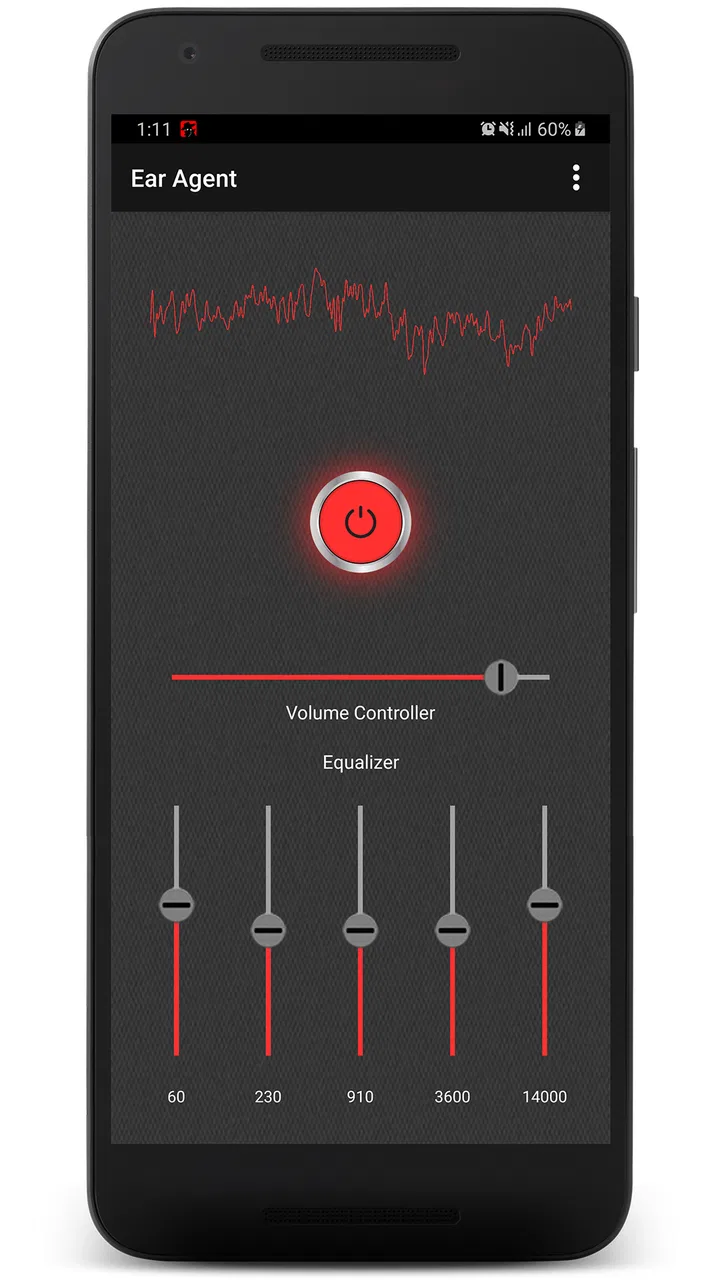
- Simple interface makes basic listening tests quick to access.
- Useful for hearing sounds more clearly in quiet environments.
- Works with many standard wired or Bluetooth audio devices.
- May help users check whether professional hearing care is needed.
Cons
- Performance depends heavily on your phone’s microphone quality.
- Bluetooth devices may introduce noticeable audio delay.
- Background noise can make amplified sound difficult to understand.
- Continuous microphone use may drain the phone battery quickly.
- It is not a substitute for a medically fitted hearing aid.

Ear Agent Live : Hearing Aid
Gallery